What kind of Deal should I create for Tenant Rep vs Landlord Rep vs other types?
CoStar Brokerage Applications has different types of records that can all represent a “Deal”. Choosing the right type depends on the circumstances, e.g. which side your firm represents, the current stage the Deal, and the kind of information you wish to track and/or interact with.
Closed Deals
Regardless of the nature of the Deal and which side was represented, if the transaction has completed (lease contract signed, sale escrow closed, etc.), you should create a Closed Deal. In some cases, the Deal may already be in the system as an Availability, Need, or Project (see below for more details). You can transition those records to a Closed Deal by opening the record and clicking on the “Close This Deal” option at the top.
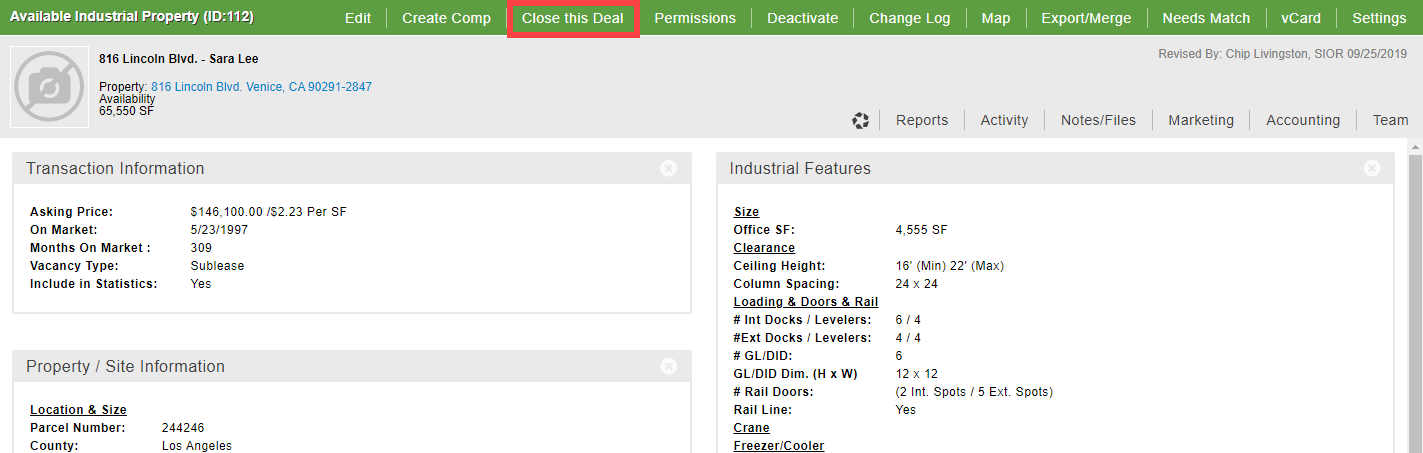
If this Deal is not in the system yet, you can skip straight to creating a new Closed Deal via the Home page. You don’t need to start by creating an Availability, Need or Project first.

Availabilities
Availabilities represent listings on the market. Some clients track all available spaces in their market. Most enter only their listings, i.e. Seller or Landlord Rep deals.
You can track all of the property, space, and listing details on an Availability, as well as internal information such as the current deal status, all associated contacts, and anticipated lease value and fees.

Needs
Needs allow you to keep track of a tenant’s requirements. If you have a large tenant with different requirements in different markets, we recommend tracking those in separate Needs. That way, you can transition an individual Need to a Closed Deal once the lease is signed. (We also recommend linking all associated Needs for the same client to an Assignment - see below.)

Some clients prefer to track Tenant Rep deals via Project records (see next section), which have less detail and can’t be matched by the system with Availabilities that fulfill the tenant requirements.
Projects
Projects are for tracking a more generic type of deal, such as for consulting or broker opinion of value. You can indicate a specific Property associated with this deal, but not specific listing details or tenant requirements.

Dual Representation
What if your firm represents both sides of the deal?
You probably won’t know that you definitely represent both sides of the same transaction until the lease is executed or the sale is in escrow. At that point, you can just create a Closed Deal and indicate who represented which side when adding the deal details and contacts.


If you are already tracking the active listing, you would represent that via an Availability. If you are already tracking the tenant requirements, you would use a Need (or Project). That means you may end up with 2 records that ultimately represent the same deal. Fortunately, the process of creating a Closed Deal has a step to address this. Most clients will “Close This Deal” from the Availability. There is an option during or after the Closed Deal process to link the Need (or Project) to the Deal, which will update the Need or Project so that it no longer shows on any Pipeline lists or reports. Contact your system administrator if you don’t see that option.

Assignments
So when should you create an Assignment?
Deals represent individual transactions (one listing, lease, or sale). Assignments represent your engagement with the client and can encompass multiple Deals.
For example, if you have a 1-year listing agreement for a multi-tenant building, you would create a single Assignment for that agreement. Each individual lease listed and/or signed should be represented by an Availability or Closed Deal linked to that Assignment.

For Tenant Rep engagements, an Assignment can represent your engagement with a Tenant to look for multiple spaces for them. A Need or Project would then represent each active requirement, and a Closed Deal would represent each signed lease.

To determine which type of record to create in CoStar Brokerage Applications for your deal, first consider what kind of information you wish to track, then select the option that best fits your needs.
© 2023 CoStar Group
Attachments:
 2023-02-10_14-44-12.png (image/png)
2023-02-10_14-46-19.png (image/png)
2023-02-10_14-51-00.png (image/png)
2023-02-10_14-44-12.png (image/png)
2023-02-10_14-46-19.png (image/png)
2023-02-10_14-51-00.png (image/png)
 2023-02-10_14-55-22.png (image/png)
2023-02-10_16-52-20.png (image/png)
2023-02-10_16-55-24.png (image/png)
2023-02-13_14-22-55.png (image/png)
2023-02-10_14-55-22.png (image/png)
2023-02-10_16-52-20.png (image/png)
2023-02-10_16-55-24.png (image/png)
2023-02-13_14-22-55.png (image/png)
 2023-02-13_14-21-29.png (image/png)
 2023-02-13_14-29-39.png (image/png)
2023-02-13_14-29-53.png (image/png)
2023-02-13_14-30-12.png (image/png)
2023-02-13_16-23-09.png (image/png)
2023-02-13_14-29-39.png (image/png)
2023-02-13_14-29-53.png (image/png)
2023-02-13_14-30-12.png (image/png)
2023-02-13_16-23-09.png (image/png)
 2023-02-13_16-24-48.png (image/png)
2023-02-13_16-43-09.png (image/png)
2023-02-13_16-24-48.png (image/png)
2023-02-13_16-43-09.png (image/png)