Released: April, 2020
Summary
To simplify the ongoing support of your Brokerage Applications system, we have developed a new 'Help Center' website. The Help Center is designed to be your first stop to get the latest release information, find frequently asked questions, training videos and more.
Navigating to the Help Center: Clicking on your name in the top right hand corner of your home page within your Brokerage Applications system will access the ‘My Settings’ menu. Clicking the ‘Help Center’ menu item will launch the Help Center in a new browser window.
We have removed the links to Recent Updates, the YouTube channel, as well the LinkedIn group from the My Settings menu. Those links are now accessible through the new Help Center site.

Help Center - Home Page
Once you click the link from your Brokerage Applications system, you should see the following Help Center home page.
All of the information found within the Help Center is public. Therefore, once you reach the Help Center, a Login and Password is not necessary and is only needed by internal CoStar employees for maintaining the site.

1. Shortcuts
Clicking the arrow in the top left corner of the page will expand to reflect the shortcuts to our User Group on LinkedIn, Payment Portal, as well as our YouTube channel (Training Videos). There are also links to most frequently visited pages within the site.

2. Search
The simplest way to get started finding solutions is to use the search feature. Simply type your question, or keyword(s) of the subject you are interested in, press enter, and you will see related articles, videos, and frequently asked questions.
You may see the word ‘label’ used throughout the help site. ‘Label’ is synonymous with keyword. Each article, video, and FAQ is embedded with keywords which are used to drive the search feature.
3. Quick Links
Reviewing a historical collection of support topics, we have organized all of the documentation into six different categories. Clicking on the title (not the image), will take you to a focused page about the specific topic.
New or updated features: This section will always contain the most recently updated articles, FAQs, and release documents.
Frequently asked questions: This should be your first stop if you have a question, as this is a collection of our most popular questions received by our support team.
How do I … ?: This section is designed to support organizations looking to either train, or confirm how to perform various tasks/procedures within the system such as closing a deal, filling out a split worksheet, or creating a comp.
Something went wrong: This section is a collection of troubleshooting articles with slightly more complex solutions pertaining to workflows, editing/reversing existing closed deals, etc.
I want to view or pay my bill: Following this link will take you directly to our billtrust.com website. From here you will be prompted for security credentials to enter the site.
I need additional help: Need further support for product/technical support, questions about your account, or setup a special request for your installation (training, customer report, or data migration)? This section will help facilitate a communication directly with our support team.
4. Recent Updates
This section is a compilation of our most recently updated documents explaining the latest features within a release, or updated functionality on an existing feature.
If you have any questions or would like to schedule a detailed training on this feature, please contact [email protected].
© 2023 CoStar Group
Attachments:
 headphones KB.png (image/png)
 headphones KB.png (image/png)
 FAQ KB.png (image/png)
 HowDoI KB.png (image/png)
 GoneWrong KB.png (image/png)
 Dolla KB.png (image/png)
 New Logo KB.png (image/png)
 image-20200311-190155.png (image/png)
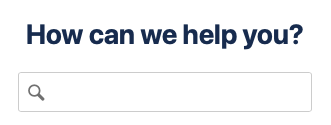 image-20200311-190213.png (image/png)
 headphones KB.png (image/png)
 New Logo KB.png (image/png)
 FAQ KB.png (image/png)
 Dolla KB.png (image/png)
 HowDoI KB.png (image/png)
 GoneWrong KB.png (image/png)
 headphones KB.png (image/png)
 b73fb2cf-7d0b-4ff5-85ab-2c9eeba54777 (image/png)
8696fc00-1fd2-4c37-a2f3-6f5bd50a82d5 (image/png)
image-20200401-133904.png (image/png)
b73fb2cf-7d0b-4ff5-85ab-2c9eeba54777 (image/png)
8696fc00-1fd2-4c37-a2f3-6f5bd50a82d5 (image/png)
image-20200401-133904.png (image/png)
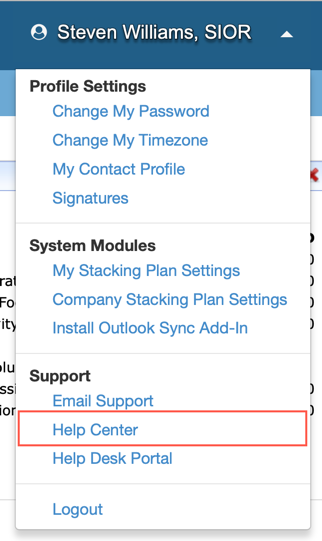 image-20200401-155540.png (image/png)
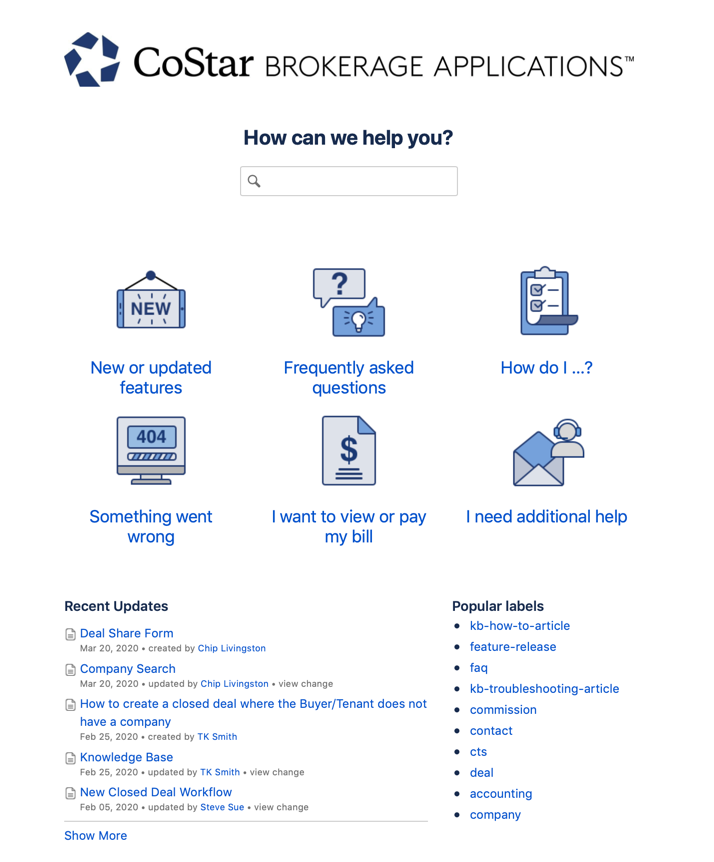 image-20200401-214128.png (image/png)
 image-20200401-215551.png (image/png)
 GoneWrong KB.png (image/png)
 GoneWrong KB.png (image/png)
 GoneWrong KB.png (image/png)
 Dolla KB.png (image/png)
 headphones KB.png (image/png)
 FAQ KB.png (image/png)