In the Closed Deal workflow, the system requires an active company record in order to invoice that customer. If you do not see the desired Company in the Customer pulldown on the ‘Invoicing’ tab, go to the ‘Contacts’ tab and make sure the customer entry is an active company record.
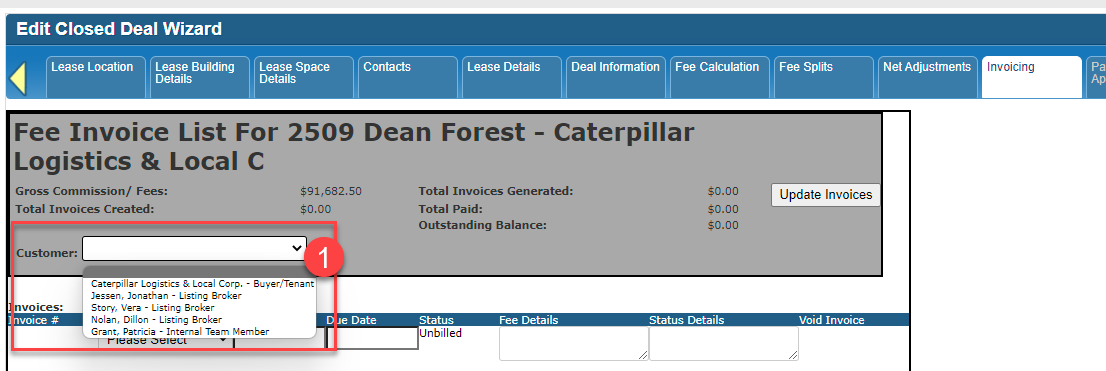
Missing Company name in Customer pulldown.
NOTE: The Closed Deal ‘Contacts’ tab does allow you to enter a flat company name and does not require you to link to an active Company record.
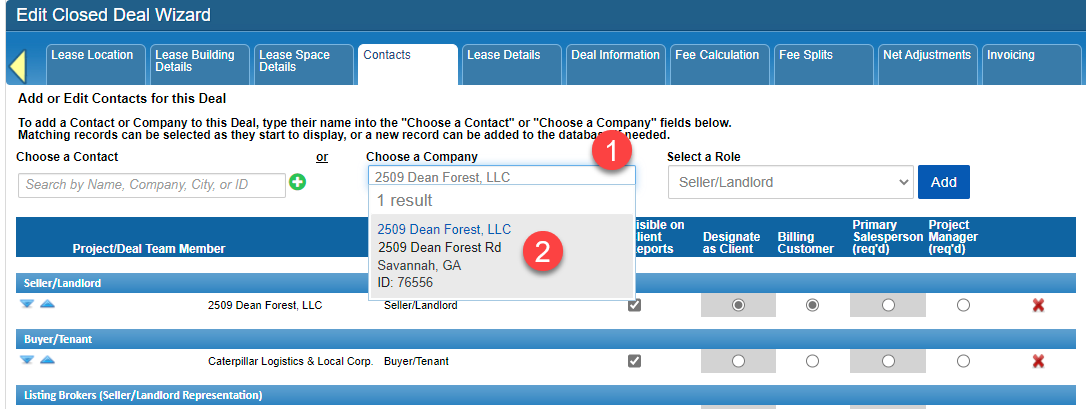
You can add Company name to the deal and not select an existing Company record on the ‘Contacts’ tab.
If you are going to be invoicing a company, you will want to select the existing Company record OR create a new company record.
Attachments:
 image-20221107-213510.png (image/png)
image-20221107-213740.png (image/png)
image-20221107-213510.png (image/png)
image-20221107-213740.png (image/png)
 image-20221107-213900.png (image/png)