Payroll Periods are used on the Broker Pay Sheet reports to help users easily select a pay period without having to know which dates define that pay period.
Instructions
From the Home page, open the Accounting menu and click on Payroll Periods.

Users must have the Accounting:Admin login User Group to have access to this form.
On the Define Payroll Periods form:
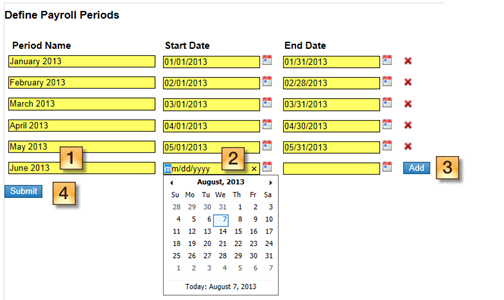
Enter a user-friendly name for that Payroll Period, e.g. “January 2013”, or “July 15, 2013”.
Enter the Start and End Dates for the Payroll Period, either by selecting the date in the pop-up calendar, or by manually typing in the date. Note: Dates on this form are in mm/dd/yyyy format (e.g. 01/01/2013).
Click the “Add” button to enter a new Payroll Period.
Click “Submit” to save your changes.
The form will warn you if there is either a gap between Payroll Period dates, or an overlap. The system will allow gaps between dates.

The system will not allow overlapping Payroll Period dates.

Related articles
Overview of the Broker Paysheet Report
Diagram of the Broker Draw and Payroll workflow
How to import Account Transactions
© 2023 CoStar Group
Attachments:
 image-20191219-003003.png (image/png)
image-20191219-003046.png (image/png)
image-20191219-003110.png (image/png)
image-20191219-003127.png (image/png)
image-20191219-003003.png (image/png)
image-20191219-003046.png (image/png)
image-20191219-003110.png (image/png)
image-20191219-003127.png (image/png)