Released: 8/2020
Summary
The List actions (“I want to….”) names have been improved. The List actions are found at the top of each list:
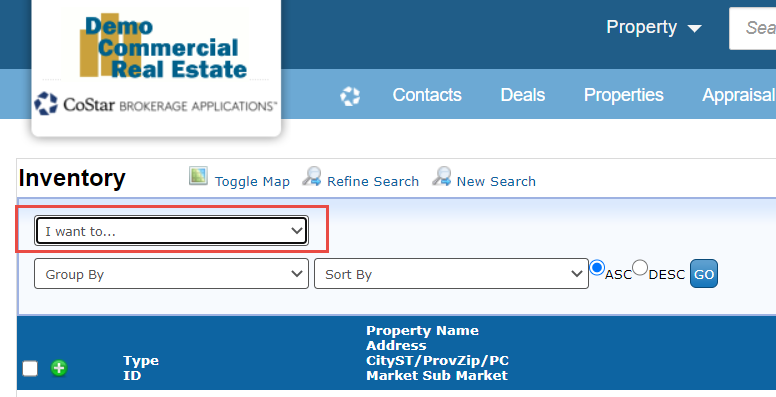
No List action has been changed, removed or added. This update is only a label name change. All List actions will perform as they did prior to this update.
List action name update details
Here is a summary of the changes made in this update.
Name updates:
New List action name | Old List action name |
|---|---|
Report/Export (all or selected) | Report on All or Selected records |
Add a note/file to selected | Add a Note/File to the Selected |
Add/Remove permissions from selected | Add/Remove Permissions from Selected records |
Add selected to a group | Add the Selected records to a Group |
Add selected to a relationship | Add a Relationship to the Selected records |
Add selected to a saved set | Add the Selected records to a Saved Set |
Append selected to a another search | Append another Search to the Selected records |
Copy selected to the clipboard | Copy Selected to the Clipboard |
Deactivate selected records | Deactivate the Selected records |
Deduplicate selected | Deduplicate the Selected records |
Delete selected records | Delete the Selected records |
Email selected | Email the Selected records |
Filter selected | Filter list by the selected records |
Save this search | Save this Search |
Save/Re-Order selected | Save/Re-Order the Selected records |
Update selected | Update the Selected records |
View selected records | View the Selected records |
Export (legacy) | Export All or selected records in the list |
List action order
Report/Export (all or selected) - will always be the first option in the List action pulldown (if it is an available action on the list). This option contains all available Reports and Exports for that list.
Export (legacy) - will always be the last option. All Exports should now be available in the ‘Report/Export (all or selected)’. The ‘Export (legacy)’ should no longer be used.
All other List actions will be displayed in alphabetical order.
If you have any questions or would like to schedule a detailed training on this feature, please contact [email protected].
© 2023 CoStar Group
