I forgot my password how can I reset it?
Here are the steps:
Go to your Costar Brokerage Applications system (https://xxxx.reapplications.com).
On the Login page, select the "Forgot your password? Click here" link just below the Submit bar.

Enter your Login and email (note: the email address should be the same email address listed on your Contact record e.g. work email address).

Select the Submit button.

You should receive a reset email within a few minutes after selecting the submit button.
Following the instructions on the email to reset your password.
NOTE: If you don't received the email shortly, check your Spam and Junk email folders for the missing email or contact your network admin to verify your login name and email address.
Password Reset Requests List (for Login Administration)
Released: August, 2020
If you are a Login Administrator (User Group of Login: Admin), we have created a list to assist you in helping users that may need help resetting their password. On your main dashboard, under the Admin menu, you will see ‘Password Reset Requests’. Clicking on this link will take you to a list showing which Logins have recently requested a new password, the login and email entered during the process, as well as key contact information related to the Login.

One of the most common causes of a user not receiving their reset link via email is entering an email that is not associated with the Login. You can quickly compare the email provided to the one associated with the Login to eliminate that as a possible cause.

If your user appears to have entered both the Login as well as the associated email correctly (Request Successful = Yes), and after checking the users ‘Trash’ folder you can contact the Support Team for further assistance.
© 2023 CoStar Group
Attachments:
 image-20200602-152057.png (image/png)
 image-20200602-152117.png (image/png)
image-20200602-152403.png (image/png)
image-20200602-152117.png (image/png)
image-20200602-152403.png (image/png)
 image-20200602-152552.png (image/png)
 image-20200803-210410.png (image/png)
 image-20200803-210445.png (image/png)
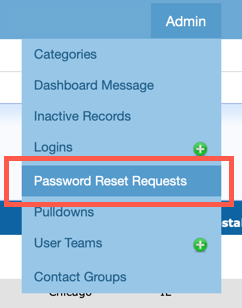 image-20200803-214648.png (image/png)
 image-20210927-182009.png (image/png)
image-20210927-182134.png (image/png)
image-20210927-182009.png (image/png)
image-20210927-182134.png (image/png)