This training is designed for new system Network Admins.
GENERAL
General System Navigation - this is a general overview of your CoStar Brokerage Applications System (CLICK HERE) to learn more.
User Settings Menu - this will summarize the User Settings menu options (CLICK HERE) to learn more.
ADMIN MENU
Categories - this will take you to a list for managing Category values. Certain pulldown (or drop-down menu) values are stored as a Category. It is best to contact Help Desk for assistance.
Dashboard Message - there are 6 dashboard widgets. This menu item allows you to update the text that appears on those dashboard widgets:
Home Message
Company Message
Local Message
Company Links
Company Tools
New Deals
Inactive Records - when records are deactivated, they are no longer visible in the system but can still be managed and reactivated from the Inactive Records list. There are 5 types of records that can be reactivated, click (CLICK HERE) to learn more:
Contact
Projects
Property
Avail/Comps
Signs
Login - allows you to create and manage user logins (CLICK HERE) to learn more about Loging Administration. Here are some articles that will help you setup user permissions:
User Group Permissions - Definitions - Help Center - Help Center (atlassian.net)
Setup User Permissions by Role - Help Center - Help Center (atlassian.net)
Password Reset Requests - allows you to monitor and troubleshoot password reset requests (CLICK HERE) to learn more about this list. This article will explain how users can reset their own password:
Password Reset - Help Center - Help Center (atlassian.net)
Pulldowns - allow you to add or change system pulldown values (CLICK HERE) to learn more.
User Teams - The ‘User Teams’ functionality is used to automatically add a “Team” of users (with predefined permissions) to new deals upon creation (or the User Team can also be added manually after initial creation), (CLICK HERE) to learn more.
ADMIN WIDGETS
Data Cleanup Widget - the data cleanup widget provides tools to maintenance your database. It is recommended to complete the Contact, Company and Property deduplication worksheets on a regular schedule.
Company Name Scrub - should be the first step and will normalize your company names across the system to make the company and contact deduplication process more efficient (CLICK HERE) to learn more.
Contact Deduplication - the contact deduplication process will help you remove duplicate contact records from your system (CLICK HERE)
Property Deduplication - the property deduplication process will help you remove duplicate property records (CLICK HERE) to learn more.
The Company Deduplication works in a similar fashion, and it is recommended to run the Company Deduplication process before the Contact Deduplication process.
Data Import - the data import widget allows you to import Account Transactions, Company, Contacts, Properties, Availabilities and Market Statistics. Here are some articles that will guide you on importing data into your system:
Import Tool for Creating Comps - Help Center - Help Center (atlassian.net)
Import Tool for updating Availabilities - Help Center - Help Center (atlassian.net)
Import Tool for Property Records - Help Center - Help Center (atlassian.net)
It is highly recommended to work with the Support team to review your data import templates, they can help review your data and provide recommendations on how to improve the import success rate.
Data Tools - this info widget has been discontinued and should not be used.
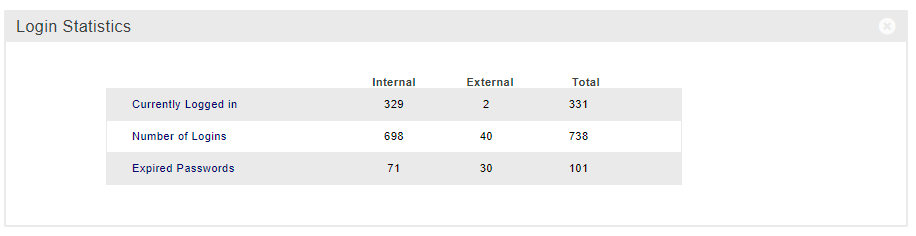
Login Statistics - this widget can tell you real-time statistics on how many Internal, Externa and Total users are logged into your system at any given time.
System Usage Reports - this widget has 2 reports:
System Usage Statistics Summary report - this report summarizes individual users' usage over time.
Export Log - shows you what exports a user has exported and how many records were included in each export.
WIDGET PERMISSIONS
All system widgets have permissions that can be altered on a widget-by-widget basis (CLICK HERE) to learn more.
LIST ADMIN FUNCTIONS
The Company, Contact and Inventory lists have a list option to deduplicate individually selected records. This functionality works in a similar way (CLICK HERE) to learn more.
CREATING NEW INTERNAL CONTACT
Creating a new Internal Contact will be a regular request (CLICK HERE) to learn more. Internal Contacts will show up in the Contact Internal Roster list.
